South African transport management

A TMS built for South African trucking.

Give owners and dispatchers the information to run more efficiently. Plan with a route optimiser that accounts for the truck, the load and the journey home. Bring trip costs, driver performance and daily priorities into one view of your business.

No card. 90 days, up to 50 trucks. Then R500 per truck a month — cancel any time.

Latest road travel timesUpdated 36 min ago

N14City Deep → Upington

Distance
816km
Free flow
643min
Latest sample
646min

Travel time at the latest sample was 0% above free flow. One of 76 sampled directions. An hourly rotation revisits each direction within about 10 hours when requests succeed. Border samples measure approach-road travel, not clearance time.

View all 76 directions
  • N3Durban → City Deeprotating
  • N3City Deep → Durbanrotating
  • N3Durban → Pietermaritzburgrotating
  • N3Pietermaritzburg → Durbanrotating
  • N3Durban → Ladysmithrotating
  • N3Ladysmith → Durbanrotating
  • N1City Deep → Bloemfonteinrotating
  • N1Bloemfontein → City Deeprotating
  • N1Bloemfontein → Cape Townrotating
  • N1Cape Town → Bloemfonteinrotating
  • N2Durban → Richards Bayrotating
  • N2Richards Bay → Durbanrotating
  • N4City Deep → Rustenburgrotating
  • N4Rustenburg → City Deeprotating
  • N4/N12City Deep → Emalahlenirotating
  • N4/N12Emalahleni → City Deeprotating
  • N4City Deep → Mbombelarotating
  • N4Mbombela → City Deeprotating
  • N1City Deep → Polokwanerotating
  • N1Polokwane → City Deeprotating
  • N2Cape Town → Georgerotating
  • N2George → Cape Townrotating
  • N2George → Gqeberharotating
  • N2Gqeberha → Georgerotating
  • N2Gqeberha → East Londonrotating
  • N2East London → Gqeberharotating
  • N2East London → Durbanrotating
  • N2Durban → East Londonrotating
  • N6Bloemfontein → East Londonrotating
  • N6East London → Bloemfonteinrotating
  • N8Bloemfontein → Kimberleyrotating
  • N8Kimberley → Bloemfonteinrotating
  • N8/N10Kimberley → Upingtonrotating
  • N8/N10Upington → Kimberleyrotating
  • N10Gqeberha → Upingtonrotating
  • N10Upington → Gqeberharotating
  • N12City Deep → Kimberleyrotating
  • N12Kimberley → City Deeprotating
  • N14City Deep → Upingtonthis sample
  • N14Upington → City Deeprotating
  • N11Ladysmith → Newcastlerotating
  • N11Newcastle → Ladysmithrotating
  • N11Newcastle → Ermelorotating
  • N11Ermelo → Newcastlerotating
  • N11/N4Ermelo → Emalahlenirotating
  • N11/N4Emalahleni → Ermelorotating
  • N17City Deep → Ermelorotating
  • N17Ermelo → City Deeprotating
  • N2Ermelo → Richards Bayrotating
  • N2Richards Bay → Ermelorotating
  • N1/N5Bloemfontein → Harrismithrotating
  • N1/N5Harrismith → Bloemfonteinrotating
  • N7Cape Town → Springbokrotating
  • N7Springbok → Cape Townrotating
  • N1Polokwane → Beitbridge approachrotating
  • N1Beitbridge approach → Polokwanerotating
  • N4Mbombela → Lebombo approachrotating
  • N4Lebombo approach → Mbombelarotating
  • N4Rustenburg → Skilpadshek approachrotating
  • N4Skilpadshek approach → Rustenburgrotating
  • N4/R49Rustenburg → Kopfontein approachrotating
  • N4/R49Kopfontein approach → Rustenburgrotating
  • R567/N11Polokwane → Groblers Bridge approachrotating
  • R567/N11Groblers Bridge approach → Polokwanerotating
  • N12/N18Kimberley → Ramatlabama approachrotating
  • N12/N18Ramatlabama approach → Kimberleyrotating
  • N17Ermelo → Oshoek approachrotating
  • N17Oshoek approach → Ermelorotating
  • N2Richards Bay → Golela approachrotating
  • N2Golela approach → Richards Bayrotating
  • N8Bloemfontein → Maseru approachrotating
  • N8Maseru approach → Bloemfonteinrotating
  • N10Upington → Nakop approachrotating
  • N10Nakop approach → Upingtonrotating
  • N7Springbok → Vioolsdrift approachrotating
  • N7Vioolsdrift approach → Springbokrotating

Route optimiser

Plan the delivery and the cost of getting home

The last delivery is only part of the journey. Vulaway brings stop ordering, load-aware fuel estimates and the empty return into your dispatch decisions.

Find a better stop order
Compare the estimated cost of delivery sequences, including the return. Check delivery windows and recorded driver-hours and load constraints where available.
Estimate fuel for the truck and its load
Use vehicle class, cargo weight, distance and road slope to estimate consumption. See loaded outbound and empty-return litres separately.
See the basis for the decision
Review the route comparison before applying it. Fuel assumptions and missing elevation coverage stay visible, with estimates separate from recorded trip costs.
Try route planning

Illustrative delivery

Jacobs depot → Isipingo depot

8-tonne rigid · 4.5 tonnes of dry freight

  1. Loaded outbound

    4.5 t cargo · 9.9 km

    3.06 L

  2. Empty return

    0 t cargo · 10.5 km

    2.70 L

Round-trip fuel estimate

5.76 L

R147.69
at an assumed R25.64/L

Fictional demo trip using a road-slope fuel model. Figures illustrate the calculation, not measured consumption or guaranteed savings. Actual use depends on the vehicle and conditions.

Freight operations

For local deliveries, long-haul and specialist loads

Distribution and palletised freight
Plan depot-to-customer and multi-stop deliveries.
Long-haul freight
Manage corridor runs with measured road-time history.
Quarry and mine bulk
Track repeated loads, weighbridge tickets and accepted tonnes.
Dangerous goods
Record the UN number and hazard class, with credential checks at assignment.
Containers and drayage
Check gate conditions and published terminal windows.
Cross-border
Keep SADC and non-SADC trade document sets together.

Use the delivery tools for your everyday work. Add bulk, cross-border and port tools where you need them.

For owners and dispatchers

Make better decisions across your fleet

See where money is going, which jobs need attention and how your team is performing. Owners can review the business while dispatchers keep the day's work moving, with access suited to each role.

The owner's overview

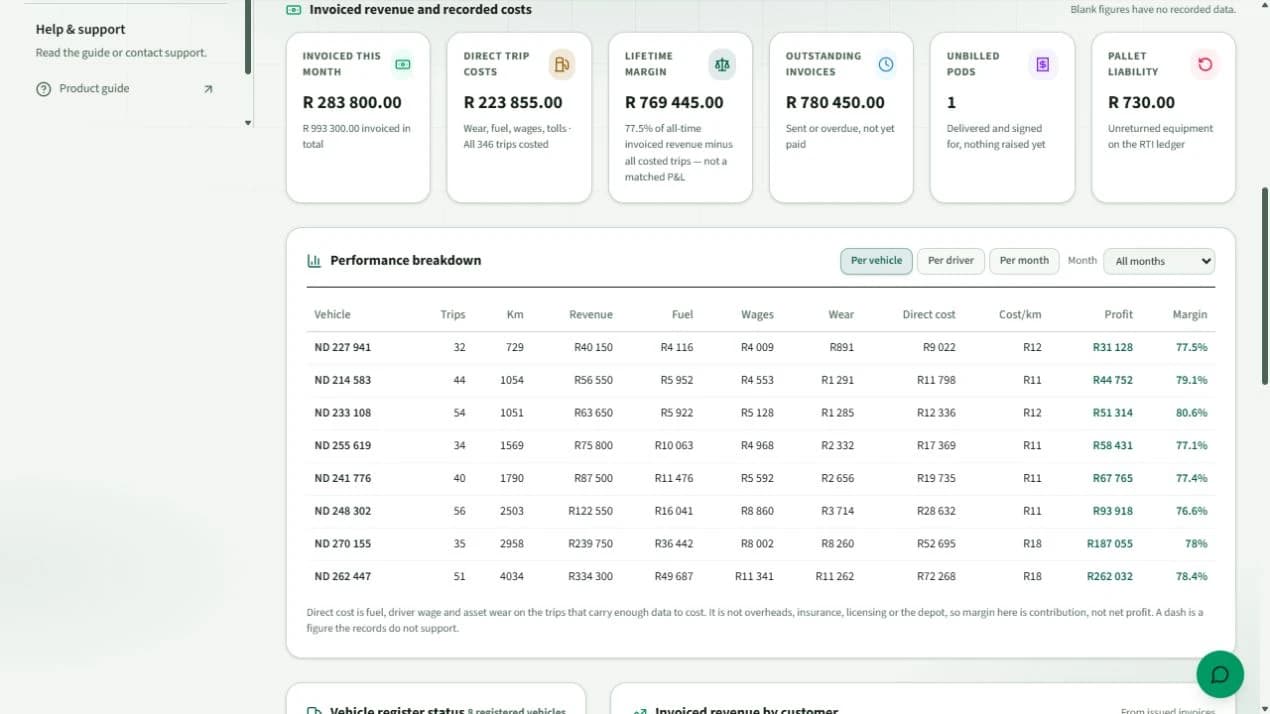
Bring revenue, direct trip costs, outstanding invoices and unbilled PODs together before deciding what needs attention.

  • Review performance by truck, driver or month to investigate cost and margin differences.
  • Follow up unpaid invoices and completed deliveries that still need billing.
  • Use recorded fuel, wages and wear costs to assess trip profitability; incomplete costs stay flagged.
Explore the owner overview

The dispatcher's daily priorities

See today's jobs, working and available trucks, and operational exceptions together. Open the relevant job to take the next action.

  • Prioritise late deliveries, missing PODs and jobs that need attention.
  • Compare delivery stop orders and round-trip fuel estimates before committing to a plan.
  • Follow trip progress and available location updates to coordinate drivers and customers.
Explore the dispatch workspace
Owner dashboard showing invoiced revenue, recorded trip costs, outstanding invoices and performance by vehicle
Swipe sideways to inspect the enlarged view. Owner overview with fictional demo data. The dashboard shows recorded revenue and direct costs; the displayed margins exclude overheads and are not net profit or actual client results. Open full screenshot

Understand each driver’s performance

Use punctuality, paperwork, dispatch responses and recorded credentials to guide follow-ups and coaching. Review fuel use alongside the vehicle, load and route when comparing drivers.

Explore driver performance
A clearer performance record
Review driving-time performance, POD completion, acknowledgement of dispatch messages and credential status.
Average fuel use in L/km
See measured litres per kilometre and L/100 km when completed trips have consumption records, with the number of trips behind the average. Planned averages appear separately; fuel purchases are not treated as consumption.

The tools behind a more efficient operation

Open a topic to see what your team can manage in Vulaway.

Trip profitability, rate cards and invoicing

Filter trip profitability to the work you want to review. Manage delivery rate cards, prepare invoices from verified POD charges and export issued invoices for your accounting package.

Explore commercial tools
Pre-trip inspections, maintenance and compliance records

Review inspections, services, tyres and defects, including recorded costs. Keep vehicle and driver documents together, follow expiry alerts and export supported compliance records for review.

Explore fleet records
Delivery tracking, ePOD and customer updates

Follow available truck location updates, capture delivery photos and signatures, and review PODs before billing. Share a customer tracking link for delivery progress without requiring an app.

Explore delivery tools
Returns, pallets and spare capacity

Track pallet balances, retail returns and empty-container returns. Use the load exchange to advertise available work or look for a return load when you have capacity.

Explore returns and load exchange
Bulk loads and weighbridge records

Allocate trucks and drivers to repeated loads, follow accepted tonnes and review photographed weighbridge tickets. Driver updates queue offline and sync when connected. Bulk rate cards and invoices are not yet available.

Explore bulk operations
Port conditions and departure planning

Review available road, port, vessel and weather information alongside booking-window advice. Coverage varies by port; terminal bookings are still made in Navis.

Explore port tools

One delivery record

From the first assignment to proof of delivery

Your dispatcher, driver and customer can follow the same delivery, with the information each needs.

  1. 01

    Plan

    Enter the customer, route and timing for a direct, multi-stop, bulk or port delivery.

  2. 02

    Assign

    Choose the truck and driver from your fleet. Required dangerous-goods credentials are checked before assignment.

  3. 03

    Track

    Follow the trip using your connected tracker or the driver's phone. Send the customer a link to check delivery progress.

  4. 04

    Proof of delivery

    Collect the delivery photo and recipient signature. Check the proof of delivery before preparing the invoice.

Fleet records

Keep track of documents, defects and missing PODs

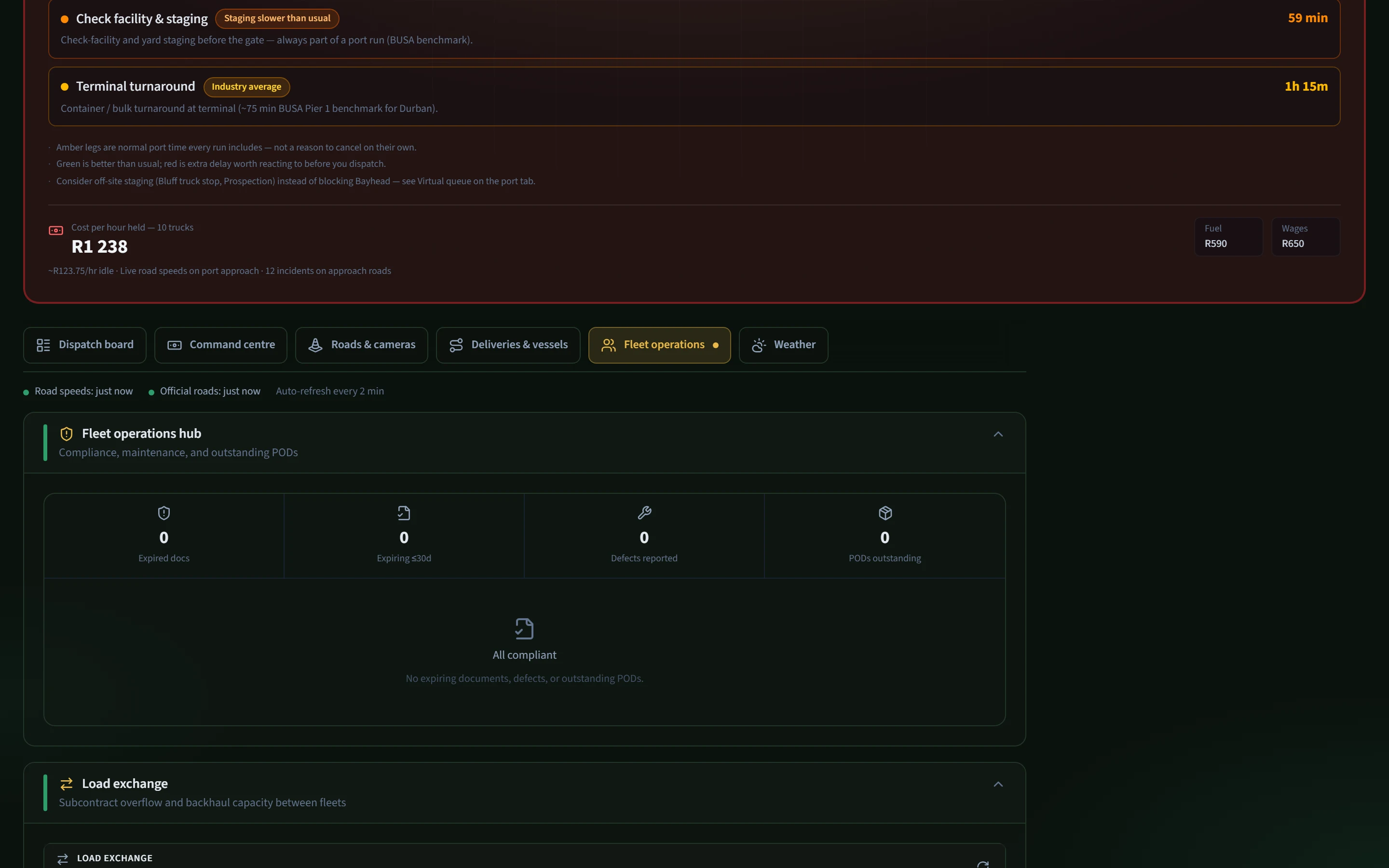
Check expiring documents, defects and outstanding PODs against your fleet records.

  • Expired documents and upcoming renewals
  • Vehicle defects and missing proof of delivery
  • Loads available for subcontracting and return trips
Fleet operations hub compliance and POD summary
Swipe sideways to inspect the enlarged view. Fleet records: documents, defects and proof of delivery. Example screen with demonstration data. Open full screenshot

Bulk and port work

Tools for bulk haulage and port deliveries

Choose the tools your fleet uses, including bulk and port work.

Bulk haulage

Record each load and weighbridge ticket

Assign trucks and drivers to quarry or mine loads. Record loading and offload times, photograph weighbridge tickets and track accepted tonnes against the order.

Port work

Check port conditions before dispatch

Switch on port tools for gate conditions, approach roads, vessel information and published stack windows. The dispatcher still makes the final call.

Optional port tools

Check gate queues, road delays and export windows

Enable port tools for gate conditions, approach roads and published stack windows when your fleet uses them.

Port tools

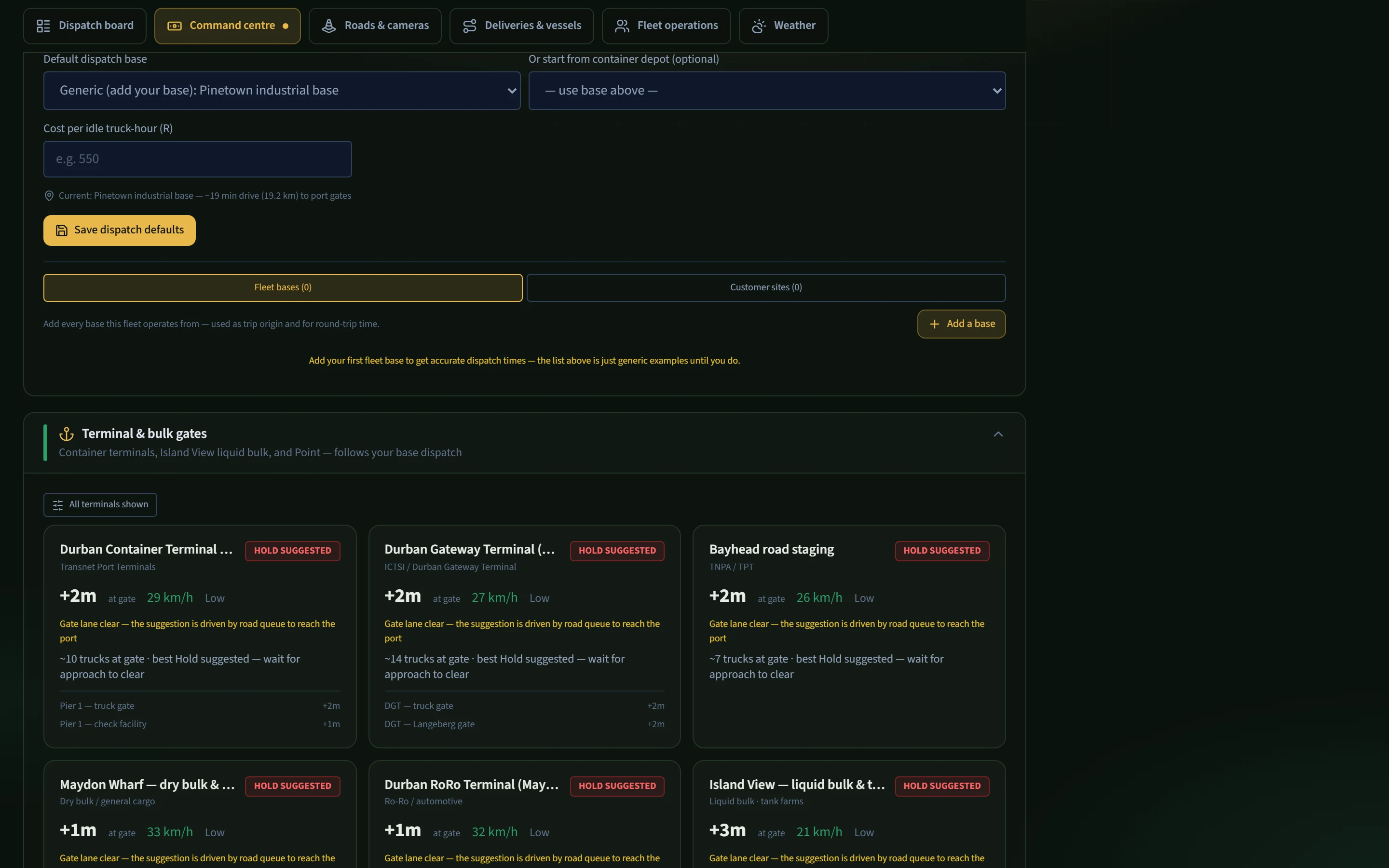
Gate conditions before dispatch

Check reported gate delays and approach-road conditions before sending a truck. Go, wait and hold suggestions help your dispatcher decide when to leave.

Port tools with hold suggested on Durban terminal gates
Swipe sideways to inspect the enlarged view. Gate conditions before dispatch. Example screen with demonstration data. Open full screenshot

Deliveries & vessels

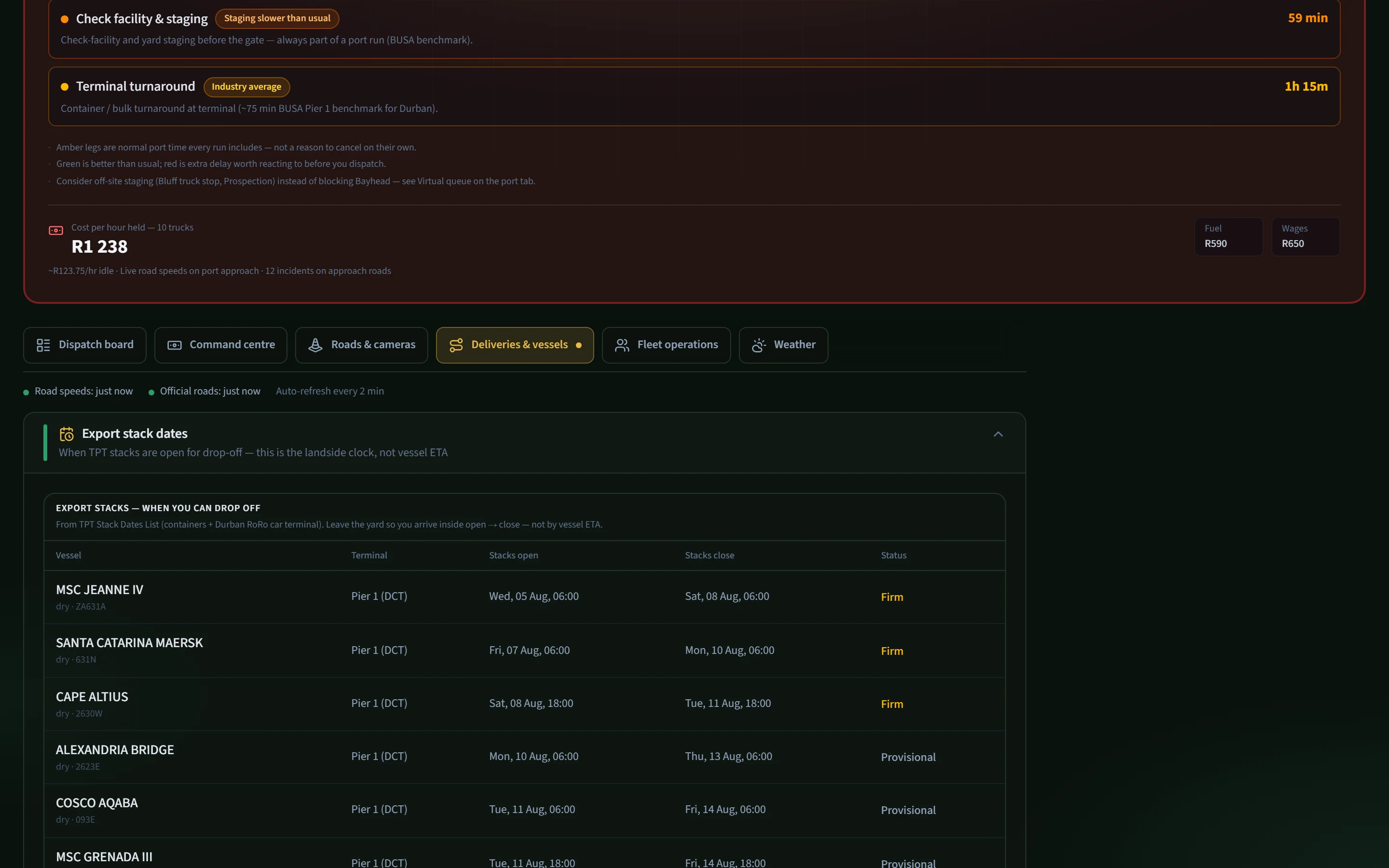
Export drop-off windows

Published TPT stack windows show when export drop-off opens and closes, so the yard run can be planned against the terminal's cut-off. Confirm the latest official notice before dispatch.

Export stack dates list for Durban RoRo car terminal
Swipe sideways to inspect the enlarged view. Export drop-off windows. Example screen with demonstration data. Open full screenshot

Roads & cameras

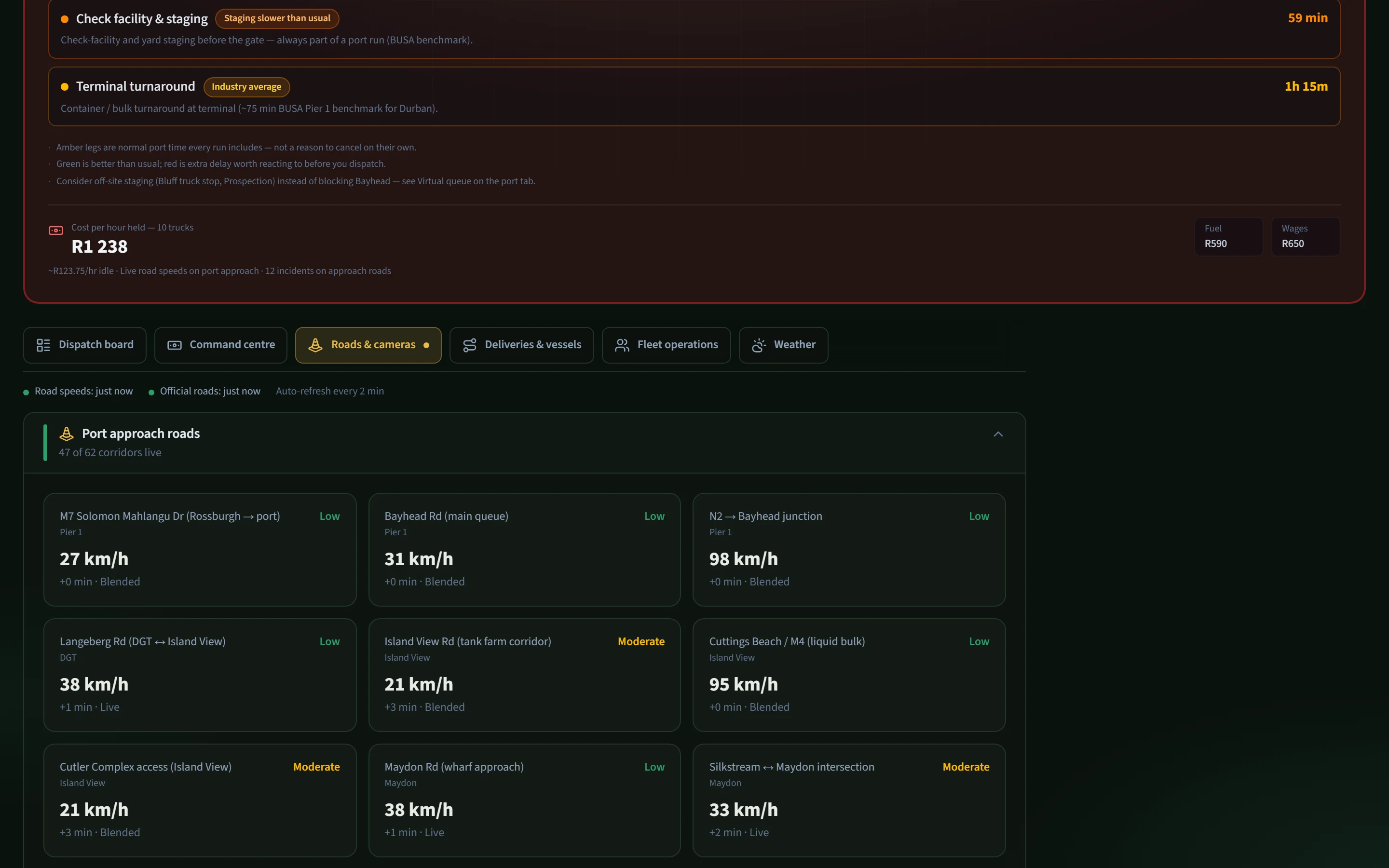
Port approach speeds and delays

Bayhead, the M7, the N2 junction and other approach legs show current or estimated speed and delay. The desk can see which part of the approach is slow before the truck joins the queue.

Port approach roads with live speeds into Durban
Swipe sideways to inspect the enlarged view. Port approach speeds and delays. Example screen with demonstration data. Open full screenshot

Mobile tools

Android apps for drivers and dispatchers

Drivers update their jobs on the road. Dispatchers collect traffic reports from the WhatsApp groups they use.

For drivers

Vulaway Driver

Drivers see their assigned truck and jobs, update progress and record deliveries.

  • Sign in with the username and password supplied by the fleet manager.
  • Confirm the job, update progress and capture proof of delivery.
  • Save location updates and bulk captures when the connection drops.

For dispatchers and owners

Vulaway Traffic

Reads traffic reports from linked WhatsApp group notifications and adds road and delay information to Vulaway.

  • Link the WhatsApp traffic groups your fleet uses.
  • Send recognised traffic reports from group notifications.
  • Keep message text, sender names and phone numbers on the device.

Download the Android apps here during the pilot. They are not listed on Google Play.

View Android app downloads

Per-truck pricing after your trial

The 90-day trial includes the fleet plan for up to 50 trucks. After the trial, pricing is per truck and includes Vulaway Driver for every assigned driver. Enterprise pricing and API access are available by arrangement.

1–10 trucks

R500

per truck / month

11–30 trucks

R400

per truck / month

31–100 trucks

R300

per truck / month

100+ trucks

R250

per truck / month

Register your fleet

Create your account, add your trucks and drivers, then plan your first delivery. Your fleet trial runs for 90 days from registration.

No card. 90 days, up to 50 trucks. Then R500 per truck a month — cancel any time.